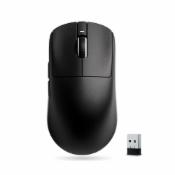
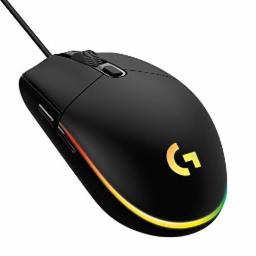
Logitech G 203 LIGHTSYNC Gaming Mouse with Customizable RGB Lighting, 6 Programmable Buttons Tracking Up to 8,000 DPI, Ultra-Light - Black

- Disclaimer
  • Amazon and the Amazon logo are trademarks of Amazon.com, Inc. or its affiliates.
  • Sometimes you may see variation in product price due to “different seller” or “offer ended”.
  • Product prices and availability are accurate as of the date/time indicated above and are subject to change. Any price and availability information displayed on the Merchant’s Site at the time of purchase will apply to the purchase of this product..
Get Logitech G 203 LIGHTSYNC Gaming Mouse with Customizable RGB Lighting, 6 Programmable Buttons Tracking Up to 8,000 DPI, Ultra-Light - Black worth Rs.2495 @ Rs.2195 only.

About this Product

Product Features:
  • High precision sensor with adjustable DPI up to 8000 DPI. LIGHTSYNC RGB Lighting
  • LIGHTSYNC Customizable RGB with customizable color wave effect with approximately 16.8 million colors
  • Time-tested 6-button design with programmable buttons using Logitech G HUB Software
  • If the mouse cursor input is slow or not working properly, close all open applications. If performance improves, the number of open applications may be interfering with your PC's connection to the mouse. Check the reported battery levels. For Bluetooth connections, select Home > Settings > Devices > Bluetooth and other devices. For wireless connections, replace batteries. Restart your PC. This will update the drivers if updates have been made recently.

  • Change the mouse cursor settings. Select Home > Settings > Devices > Mouse > Additional Mouse Options > Pointer Options and adjust the pointer speed.
  • My mouse scroll wheel is not working as expected You can use the mouse wheel to scroll and also as a button. Pressing the wheel switches to other open programs on your desktop. Sometimes, while scrolling, you can accidentally press the wheel and accidentally switch to another open program. That's why the active window seems to disappear but is still open on your desktop. If you want to return to the previous window, press the wheel until the window reappears or use the Windows taskbar to switch to the desired window. To fix the problem, avoid pressing the wheel while rolling.
  • Compatibility: Windows 7 or later macOS 10.13 or later ChromeOS USB port
Read More
   

How To Get This Deal

  • Click on Get Deal button
  • Go to Amazon deal page
  • Add Deal to your cart
  • Enter Your Billing / Shipping Address
  • Make the payment

Related Deals

Mobile Phones Top Deals

Headphone Top Deals

Home & Kitchen Top Deals

Fashion Top Deals

Smart Watches Top Deals

Laptops Top Deals

Bags, Wallets and Luggage Top Deals

Health & Personal Care Top Deals & Offers

Trending Deals

Latest Deals